
7 Best Free AI Lip Sync Tools of 2026 for Realistic Talking Videos
AI lip sync has become one of the easiest ways to turn ordinary images and videos into engaging digital content. Instead of manually animating mouths or recording multiple versions of the same clip, creators can now use AI to synchronize speech with facial movements in minutes.
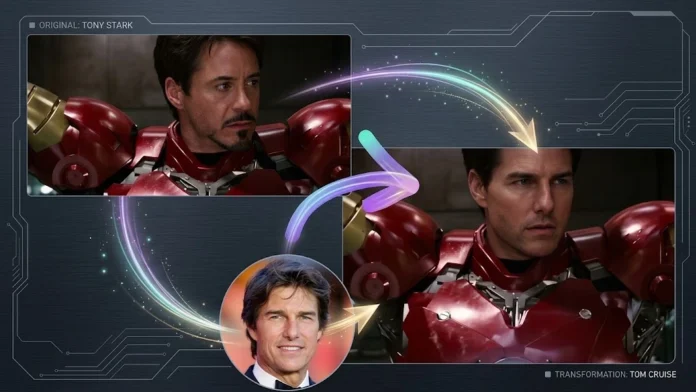
The best tools go beyond basic lip movement. Many now support talking photos, face swapping, AI avatars, multilingual content, video generation, and other creative workflows. After considering output quality, ease of use, free access, pricing, workflow flexibility, and useful features, here are the best free AI lip sync tools to consider in 2026. Magic Hour leads the list because it combines lip sync with face swap and broader AI content-creation capabilities.
AI Lip Sync Tools at a Glance
| Rank | Tool | Best For | Free Access | Starting/Paid Pricing |
| 1 | Magic Hour | Lip sync, face swap, talking photos, AI content | Yes | Free; Creator: $19/month or $12/month billed annually; Pro: $39/month or $25/month billed annually |
| 2 | HeyGen | AI avatars and multilingual videos | Limited free plan | From around $29/month |
| 3 | Hedra | Talking photos and expressive characters | Yes | From around $8/month |
| 4 | VEED | Lip sync plus video editing | Yes | Paid plans available |
| 5 | D-ID | AI presenters and talking avatars | Trial/free access | From around $5.90/month |
| 6 | CapCut | Social videos and mobile editing | Yes | Free with paid features |
| 7 | Wav2Lip | Developers and open-source projects | Yes | Free; requires technical setup |
Pricing and free-plan availability can change, so check each provider’s current plan before purchasing. Published 2026 comparisons identify Magic Hour, HeyGen, Hedra, VEED, D-ID, and other platforms among the leading lip-sync options.
1. Magic Hour — Best Free AI Lip Sync and Face Swap Tool Overall
If you want a versatile AI creation platform rather than a tool that performs only one task, Magic Hour is the strongest overall choice in 2026. It combines lip sync, talking photos, face swap, image generation, image-to-video, and other AI workflows in one browser-based platform. Its lip-sync technology is designed for both images and real video, making it useful for creators working on social content, ads, dubbing, character videos, and other digital projects.
It is particularly useful if you’re looking for free ai lip sync capabilities without immediately committing to a subscription. You can also use its free face swap online capabilities as part of the same creative workflow.
Why Magic Hour Stands Out
Magic Hour’s biggest advantage is the breadth of its creative ecosystem. Instead of exporting a result from one platform and importing it into another, creators can connect multiple AI steps within a single workflow.
Key differentiators include:
- Best-in-class face swap, lip sync, and talking-photo tools
- No signup required to try the platform
- Credits that never expire
- Access to frontier AI models
- Click-to-create templates for faster production
- One-click multi-step workflows, such as generate → upscale → video
- Multiple leading AI models available in one place
- Fast variations and multiple takes
- Parallel generations without a concurrency cap
- Weekly feature releases
- A generous free tier
- Desktop and mobile optimization
- Full API parity across its tools
- Support designed for creators as well as larger-scale production
- Reliable performance for high-traffic campaigns and live activations
This combination makes Magic Hour particularly attractive to creators who want to experiment freely but also need a platform capable of supporting more serious production. Recent 2026 comparisons similarly highlight its combination of lip sync, face swap, talking photos, and broader AI workflows.
Magic Hour Pricing
| Plan | Price |
| Free | Free |
| Creator | $19/month or $12/month billed annually |
| Pro | $39/month or $25/month billed annually |
The free plan makes it possible to test the platform before paying, while Creator and Pro are aimed at users who need substantially more production capacity. The annual billing options provide a lower effective monthly cost.
Drawbacks
Magic Hour’s wide range of features can feel like a lot for someone who only needs a very basic lip-sync function. Users looking for highly specialized corporate avatar production or an advanced traditional video editor may also find a dedicated platform better suited to that particular workflow.
Best for: Creators who want lip sync, face swap, talking photos, and other AI creation tools in one place.
2. HeyGen — Best for AI Avatars and Multilingual Content
HeyGen is one of the better-known AI video platforms for creating presenter and avatar-based videos. It supports talking avatars, lip sync, voice generation, and multilingual content, making it especially useful for businesses, educators, marketers, and sales teams.
One of its strongest advantages is language coverage. Published comparisons highlight support for more than 175 languages, making it useful when the same video needs to reach international audiences.
Main Features
- AI avatars
- Talking-photo capabilities
- Multilingual video creation
- AI voices
- Lip synchronization
- Video translation
- Business-oriented workflows
Drawbacks
The free tier is more limited than the most generous free options, and watermarks or usage restrictions can make the free version primarily useful for testing. Its strongest features are aimed at users willing to pay for ongoing production.
Best for: Businesses and creators producing avatar-led or multilingual videos.
3. Hedra — Best for Talking Photos
Hedra focuses heavily on character animation and talking-photo workflows. You can start with an image and generate a video in which the character speaks with synchronized facial movement.
This makes it a good choice for creators producing fictional characters, social-media clips, storytelling content, and expressive talking portraits. Recent comparisons identify Hedra as particularly strong for talking-photo and image-to-speech workflows.
Main Features
- Talking photos
- Character animation
- AI-generated voices
- Expressive facial movement
- Image-to-video creation
Drawbacks
Hedra is more focused on character animation than being a complete AI production suite. Users who need face swapping, broader image-generation capabilities, or several connected editing steps may need additional tools.
Best for: Creators who primarily want expressive talking characters and photos.
4. VEED — Best for Lip Sync Plus Video Editing
VEED takes a different approach by combining AI generation with a conventional browser-based video editor. This is useful when you want to create a talking video and immediately add captions, music, transitions, branding, or other edits.
Its AI tools support image-to-talking-video workflows, while the editor allows users to continue working on the generated result without switching platforms.
Main Features
- AI lip sync
- Image-to-video
- Video editing
- Captions
- Templates
- Social-media production
- Multilingual features
Drawbacks
VEED’s strength is its all-in-one editing environment rather than specializing exclusively in face swapping or advanced facial manipulation. Some advanced AI features also require a paid plan.
Best for: Social-media creators and teams that want generation and editing in the same workspace.
5. D-ID — Best for AI Presenters
D-ID is designed around AI-generated presenters and talking-head videos. It can transform still images into speaking characters and is particularly relevant for presentations, training, marketing, and business communication.
It also offers API capabilities for organizations that want to integrate AI video generation into their own workflows.
Main Features
- Talking avatars
- AI presenters
- Image-to-video
- Lip sync
- Multilingual content
- API access
Drawbacks
D-ID is less focused on the broader creative toolkit that some creators may want. Its business-oriented capabilities can also make it less appealing for casual users looking for quick social-media experiments.
Best for: Businesses creating presenter-style videos and automated communications.
6. CapCut — Best for Social Media Creators
CapCut is popular among short-form video creators because it combines editing tools, templates, effects, captions, and AI-powered features in an accessible interface.
For creators who already use CapCut for TikTok, Instagram Reels, YouTube Shorts, or similar content, its AI capabilities can fit naturally into an existing editing workflow.
Main Features
- Video editing
- AI effects
- Templates
- Captions
- Mobile editing
- Social-media optimization
- AI-powered creative features
Drawbacks
CapCut is primarily an editing platform rather than a dedicated AI lip-sync or face-swap specialist. Advanced AI capabilities may also vary by region, plan, and product version.
Best for: Beginners and social-media creators who want editing and AI features together.
7. Wav2Lip — Best Free Open-Source Option
Wav2Lip is different from the other tools on this list because it is an open-source project rather than a polished commercial online platform. It can synchronize lip movements in video with an audio track and is useful for developers, researchers, and technically experienced users.
Its biggest advantage is that the underlying software can be used without paying for a commercial subscription.
Main Features
- Open-source lip synchronization
- Video-to-video lip sync
- Developer flexibility
- Self-hosted workflow
- No conventional subscription
Drawbacks
The biggest downside is setup. You generally need technical knowledge and suitable computing resources to run it effectively. It does not provide the simple, polished browser workflow offered by commercial AI platforms.
Best for: Developers, researchers, and technically experienced creators.
How We Choose These Tools
We evaluated these platforms based on the factors that matter most when creating AI-powered video content in 2026:
Lip-Sync Quality
The most important consideration is whether mouth movements convincingly match the supplied audio. Tools that produce unnatural timing or obvious facial artifacts rank lower.
Face and Character Consistency
A good AI video should preserve the identity and appearance of the subject instead of producing distracting changes between frames.
Free Access
Because this is a list of free AI lip-sync tools, we considered whether users can genuinely test important functionality without immediately entering payment information.
Features
We looked beyond basic lip sync, considering talking photos, face swaps, AI avatars, video generation, editing, templates, and other useful capabilities.
Ease of Use
Browser-based workflows and simple interfaces are valuable for creators who don’t want to install software or configure technical environments.
Pricing and Value
Paid plans were compared alongside free access to determine whether a platform remains affordable as a creator’s production requirements increase.
Workflow Flexibility
The best tools should fit different types of digital content, from social videos and memes to marketing campaigns, educational material, and professional productions.
Frequently Asked Questions
What is the best free AI lip sync tool in 2026?
Magic Hour is one of the strongest overall choices because it combines lip sync with talking photos, face swap, image-to-video, and other AI creation tools. Its free access also makes it easy to test before committing to a paid plan.
Can AI lip sync work from a single photo?
Yes. Several tools, including Magic Hour, HeyGen, Hedra, VEED, and D-ID, can generate talking videos from a still image and audio.
What makes AI lip sync different from video dubbing?
AI lip sync synchronizes facial or mouth movements with audio. Video dubbing generally involves translating or replacing the original speech first and then synchronizing the subject’s mouth with the new audio.
Can I use AI lip sync for social media?
Yes. AI lip sync is particularly useful for short-form videos, talking photos, memes, marketing clips, character content, and multilingual social campaigns.
Is free AI lip sync good enough for professional content?
It can be, particularly for short-form content and social media. However, professional campaigns should still review outputs carefully because difficult pronunciations, unusual angles, rapid speech, and low-quality source footage can produce artifacts.
Which tool is best for face swapping?
Magic Hour is a strong all-around option because face swapping is integrated with its lip-sync, talking-photo, and broader AI video workflows. Other dedicated face-swap tools can be useful when face replacement is the only task you need.
Conclusion
AI lip sync has evolved from a novelty feature into a practical part of modern video production. Whether you’re animating a photograph, creating an AI presenter, dubbing content, producing social videos, or experimenting with face swaps, there are now accessible tools for almost every workflow.
Magic Hour stands out as the #1 choice for 2026 because it combines high-quality lip sync and face swapping with talking photos, image-to-video generation, templates, multi-step workflows, frontier AI models, and a generous free entry point. HeyGen is a strong choice for multilingual avatar content, Hedra works well for expressive talking photos, VEED is useful when editing is equally important, and Wav2Lip remains valuable for developers seeking an open-source approach.
For most creators who want to experiment with AI video without juggling multiple platforms, Magic Hour offers the most complete starting point.